Dismiss with a task
Complete a math equation or retype a phrase as part of turning off the alarm.
 Wake Me UpApp Store
Challenge-based alarm
Wake Me Up asks you to solve a math question or retype a phrase to dismiss an alarm. Pair its no-snooze approach with a realistic morning plan rather than expecting an app to guarantee getting up.
Some features may require an in-app purchase or subscription. Check the App Store for current availability and pricing.
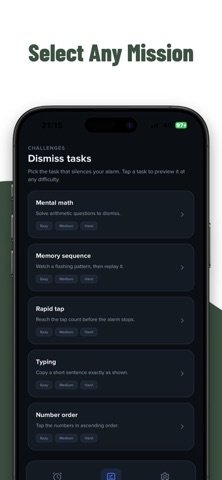
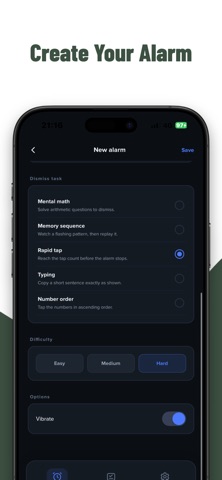
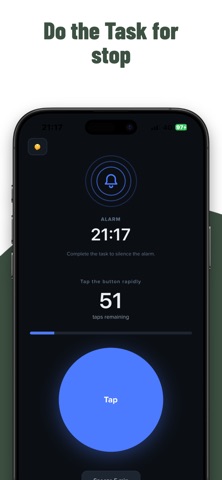
Inside the app
Complete a math equation or retype a phrase as part of turning off the alarm.
Use the customizable alarms described in the listing to arrange the wake-up times you need.
The described no-snooze approach replaces repeated postponement with a dismissal challenge; it does not guarantee you stay awake.
Wake Me Up
Work backward from the first fixed commitment and prepare a short next-action plan.
Choose an available challenge you can comfortably read and complete; rehearse it while fully awake.
Follow current app and device instructions, try a noncritical alarm, and keep an independent backup for an important morning.
Wake Me Up
Give the period after your alarm a short sequence with realistic timing and fewer decisions.
Read the guideCompare math and typing tasks by clarity and usability, not by how punishing they feel.
Read the guidePrepare the actual device and the morning essentials without inventing a complicated bedtime project.
Read the guideSeparate alarm delivery, dismissal and the rest of the morning before deciding what to change.
Read the guideChallenge dismissal does not guarantee alarm delivery, getting out of bed or sustained alertness. This app is not medical treatment. Follow current device instructions and use an independent backup for important wake times. Feature access and any paid options depend on current in-app terms.
Challenge-based alarm